New
PC screen projection
Any laptop onto every screen, straight from the browser. Pick a screen, a window or a tab — no HDMI cable, nothing to install, and it still works on old smart-TV browsers.
See it running →Event OS turns one ordinary Windows PC into a control room for every TV, projector and phone in your venue. Guests vote from their seats. Jackpot draws nobody can dispute. Queues that end the shouting. Winner reveals that make the room stand up.
No internet. No blackout panic. No technician on speed-dial.
Any laptop onto every screen, straight from the browser. Pick a screen, a window or a tab — no HDMI cable, nothing to install, and it still works on old smart-TV browsers.
See it running →One TV shows up to nine things at once — 19 layouts, a different module in each zone. The split survives a power cut and comes back exactly as it was.
See it running →Screens that switch themselves: what to show, on which screens, between which times — once, daily or on chosen weekdays. If the PC was off when a slot opened, it starts late instead of never.
Proof for award nights and elections: every ballot logged with its device and time, repeat and late votes counted separately, one CSV for the evidence pack. Super Admin only.
See it running →Everything below is the real Event OS display, running live in this page right now — not a picture of it. Tap any screen to see what your audience sees.
“A draw on a whiteboard. The winner announced by shouting. Two customers disputing the result — and one of them is filming it for Instagram.”
The counter climbs on every screen in the hall and the room goes quiet on its own. The draw runs to a schedule nobody can touch. The winner fills all 12 screens in gold. And every single action sits in a tamper-evident audit trail, so the argument ends before it starts — because the evidence is on the wall.
One disputed draw costs you the customer, the table and the video. This costs less than that, every month, forever.
“Tonight's winners are on a printed sheet taped behind the cashier. Customers crowd the desk to check whether they missed their name, and the ones who went home early never find out at all.”
Every winner from every draw pages itself across the hall — eight screens deep, with the amount and how it was paid, refreshing on its own all night. Nobody crowds the cashier. Nobody argues about who won what. And the customer who sees their own name on a wall in front of two hundred people tells that story for a week.
A win nobody sees is marketing you already paid for and threw away. This is the same money, spent once, working every night.
“Ten people waiting while someone hunts for an HDMI cable, the adapter does not fit the new laptop, and the canteen TV at the far end never gets the slides at all.”
The presenter opens one page in the browser and picks a screen, a window or a tab. Within seconds it is on every screen in the building — the boardroom, the canteen, the gate. No cable, no dongle, nothing installed on the laptop. Extend the desktop instead of mirroring it and the room sees the slides while the presenter keeps their notes. Even a 2015 smart TV shows the picture.
One page in a browser replaces the cable drawer, the adapters and the ten minutes every meeting loses looking for them.


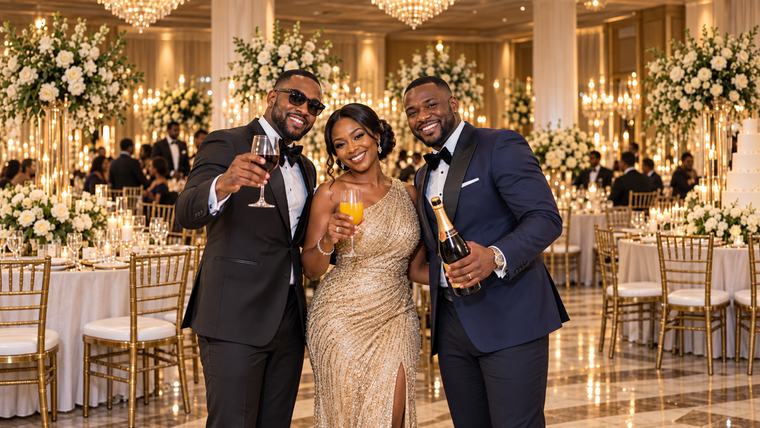
“The MC asks ‘who was best dressed?’ and 200 people shout different names. Ten minutes later the moment is gone and nobody remembers who won.”
Guests scan a QR from their seats — no app, no download, works on a 2G Tecno. The bars race across the big screen as the votes land, duplicate votes are blocked automatically, and the whole room watches the result arrive together. That is the clip that ends up on everyone's status.
The cheapest way to turn an audience into participants — and participants never leave early.
“The accident board at the gate was last updated in March. The output figures live on a clipboard in the supervisor's office. The notice about Friday's meeting is behind a torn poster.”
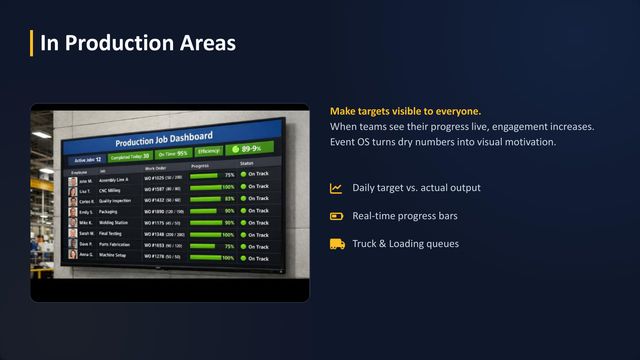
One TV, three jobs at once. On the left, the days without an accident count up by themselves. Top right, today's output for each line, typed in by a supervisor in seconds. Below, the time and this week's notice. Pick from 19 layouts, put a different module in each zone, and schedule it to change by itself at shift-change. After a power cut the screen comes back showing the same split.
Every shift walks past the same screen and reads the same numbers. That is how a safety habit forms.
Plants are quoted per site, after a free demo on your own wall.
“The winner is read off a folded paper. Half the room does not hear it. There is no moment — just an announcement.”
The suspense builds on every screen at once, the name lands in full-screen gold, and confetti falls across all 12 displays in the same heartbeat. People stand up. Phones come out. That is not a feature — that is the photo the whole event gets remembered by.
MCs: your clients will assume you hired a production company.
“A crowd at reception, everyone convinced somebody jumped the line. Staff shouting numbers over the noise. Patients standing at the desk because sitting down means losing their place.”
Everyone takes a ticket from their own phone and watches their position and estimated wait from a chair. Priority tickets quietly protect elders and expectant mothers. Reception gets quiet enough to actually work — and your Google reviews stop using the word ‘chaos’.
You are already paying for this problem in staff time, complaints and reputation. This is the version you choose.
“People pledge loudly and pay quietly. The treasurer's notebook says one number, the M-Pesa statement says another, and nobody wants to chase Uncle in public.”
Pledges arrive from any phone, the thermometer climbs on the big screen and pulls the whole room up with it — because generosity is contagious when it is visible. Every pledge tracks cash, mobile or bank status, and the committee walks out the same evening with a printable contributor report. Kindly. Automatically. In Kiswahili.
Committees that show the total live consistently close higher. The screen does the asking so nobody has to.
“The match ends, the screens go dark, and your customers walk to the bar down the road that has the same beer and the same TV.”
Half-time predictions from every phone in the room. Man-of-the-match voting. A leaderboard of regulars that people come back on Tuesday to defend. Same beer — but a night they cannot get anywhere else. That is the entire game.
Retention is not a marketing budget. It is a reason to come back.
Nobody wakes up wanting “digital signage”. They want a wedding the family talks about for years, a draw nobody can dispute, a waiting room nobody dreads. Start from your night — we will tell you exactly what it takes.
“The programme is on a folded piece of paper, the couple's names are misspelled on a PowerPoint, and the photographer's photos arrive three weeks after anyone still cares.”
The countdown builds the moment before anyone sits down. The programme updates itself as the day flexes. The winner reveal turns the bouquet toss into theatre. Guests vote best-dressed live from their phones. And the guest photo wall puts their own photos on the big screens while the party is still happening. MCs: your clients will think you hired a production company.
“A manual draw on a whiteboard. The winner announced by shouting. Two customers disputing the result — and one of them is filming it.”
Draw schedules and player registers upload in seconds. The jackpot counter pulls every eye in the hall to the wall. The winner announcement fills every screen with full-screen confetti. And every action sits in a tamper-evident audit trail — disputes end because the evidence is on the wall, and on the record.
“People pledge loudly and pay quietly. The treasurer's notebook says one number, the M-Pesa statement says another, and nobody wants to chase Uncle in public.”
Pledges come in from any phone, the thermometer climbs on the big screen and pulls the room with it, every pledge tracks its cash / mobile / bank status, and the committee leaves the same evening with a printable contributor report. Kindly, automatically, in Kiswahili.
“A crowd at reception, everyone convinced somebody jumped the line. Staff shout numbers. Patients hover at the desk because losing sight of it means losing their place.”
Everyone takes a ticket on their own phone and sees their live position and estimated wait from their seat. Priority tickets protect elders. The room goes quiet — and your reviews stop mentioning the word "chaos".
“Match ends, screens go dark, customers drift home. The bar down the road has the same beer, the same TV, the same everything.”
Half-time predictions from every phone in the room, man-of-the-match voting, and a leaderboard of regulars that people come back to defend. Same beer — but a night they cannot get anywhere else. That is the whole game.
“Printed A4 signs taped next to flat screens. Every event means a technician, a laptop and a hunt for an HDMI cable.”
Daily schedules, wayfinding and promos run themselves on every screen. And when a client books your hall, “our screens are part of the package” becomes a line item you charge for. The system pays for itself, then starts earning.
“Every meeting starts the same way — someone hunting for an HDMI cable, someone else asking whether the laptop will reach the far screen, and ten minutes gone before the first slide.”
The presenter opens one page in a browser, picks a screen, a window or a tab, and it is on every screen in the building — no cable, no dongle, nothing installed on their laptop. Extend the desktop instead of mirroring it and the room sees the slides while the presenter keeps their notes. Split the wall: live production figures on one side, the shift programme on the other. And it can be set to come on by itself at shift-change every morning. IT installs nothing.
Safety, output and notices — where every worker can see them, all day, without anyone printing a thing.
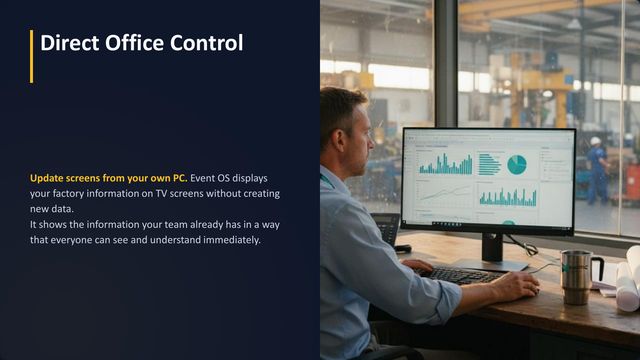
Event OS is software, not a machine. It runs on one ordinary Windows computer in your office — and feeds every TV screen in the plant.
Each TV has a small player box that we supply. It reads from the office PC over your own network — no internet needed.
Event OS is not a production-monitoring system: the numbers on the screen are the ones your team types in.
A big number on the wall that counts up by itself. Nobody wants to be the one who puts it back to zero.
Type a message once in the office. It shows on every screen. No printing, no pinning, no torn paper.
Your toolbox-talk slides and videos play through the day. New staff and visitors learn the rules without a meeting.
How much each line should make and how much it has made, typed in by a supervisor. The shift sees it is behind while there is still time.
Drivers take a number on their phone and the screen calls it, with a chime and a spoken announcement. Works for stores, the clinic and the canteen too.
One button puts an urgent message over every screen in the plant at once — an evacuation, a fire drill, a gate closure.
Shift briefings and training slides go from any office laptop to the canteen TV, straight from the browser.
The time and date on a whole screen or in one corner of it, in Kiswahili or English. Nobody ever has to touch it.
Also: staff recognition on the big screen · screens that change by themselves at shift-change · one TV split into zones
 PDF · 12 slides
Twelve slides for the plant manager, HSE and the board: where the screens go, what each one shows, and how it is set up. Read it on your phone, download it, or forward it to whoever signs off.
12 slides · English · 565 KB · free, no sign-upSend us one WhatsApp with the name of your plant. We bring a screen, set it up, and show you your own safety counter running. Thirty minutes. No cost, no obligation.
Every engineering decision started in a real African venue: power that goes, internet that costs, hardware that is mixed, and an audience on every kind of phone.
Every action is written to disk the instant it happens. When the power returns, the platform and every screen restore themselves to the exact second before the blackout. The operator does nothing. The audience never finds out.
Umeme ukirudi, kila kitu kinarudi kama kilivyokuwa.Runs on venue Wi-Fi or its own hotspot. Unplug the internet cable and the entire event keeps going.
Guests scan a QR and vote, pledge or take a ticket. No downloads, no accounts, loads on 2G.
Screens self-register and auto-scale from a tired 720p TV to a 6K wall. Always legible, always deliberate.
Interface, displays and voice announcements in both languages — switchable live, mid-event, from the control room.
Each module is licensed on its own. Buy Voting for the wedding season, add the Jackpot console when the casino contract lands. Each expires on its own, and your license mirrors your invoice line for line.
Lipa kwa M-Pesa, Tigo Pesa, Airtel Money au benki.Pick only the modules your night needs. The platform itself — unlimited screens, themes, ticker and emergency broadcast — is always included free. Longer plans save 5% on 3 months, 15% on 12.
Elegant countdowns to any moment — weddings, launches, kickoffs.
See today's price →Full running order that auto-highlights the current item.
See today's price →Suspense build-up, synchronized reveal and confetti on every screen.
See today's price →Instant two-side scoring with team colours and logos.
See today's price →Auto-sorted live rankings with medal styling.
See today's price →Rotating menus, offers and notices — plus a guest photo wall: guests beam photos from their phones to the screens.
See today's price →QR voting from any phone, animated live results, duplicate-vote protection.
See today's price →"Now Serving" ticketing with QR self-service and smart wait estimates.
See today's price →Animated progress to target, pledges from phones, M-Pesa reference capture.
See today's price →Live jackpot counter, scheduled draws, dramatic winner reveals.
See today's price →Put any computer screen — slides, dashboards, live production figures — on every screen in the building, straight from the browser. Nothing to install on the presenter's laptop.
See today's price →Unlimited screens · Themes & branding · Live ticker · Emergency broadcast · Kiswahili/English · Offline operation · Auto-recovery after power cuts
Choose modules and billing period. You get an itemized invoice with a unique payment reference.
M-Pesa, Tigo Pesa, Airtel Money or bank transfer — quoting that reference.
Enter the transaction ID on your invoice page. Our team verifies it quickly.
Your key unlocks exactly the modules you paid for — matching your invoice line by line.
Event OS is offline-first event display software built by Ellertek Solutions in Dar es Salaam, Tanzania. It runs on a single Windows PC and drives every screen at a venue or plant — live audience voting, casino jackpot counters and scheduled draws, queue management, winner reveals, harambee fundraising, digital signage, PC screen projection, split screens and scheduled screen changes, plus safety counters and notice boards for factories — in Kiswahili and English, with no internet connection needed after activation.
Full platform, every module, 3 days free. No card. No internet required to run it. Run one real event on it — that is the whole pitch.